


Switch and Controller MIDI Pedal
#MIDI
#sustain pedal
#controller
#CC64
#damper pedal
#tone-generator
#music
#instrument
#pedal
#audio control
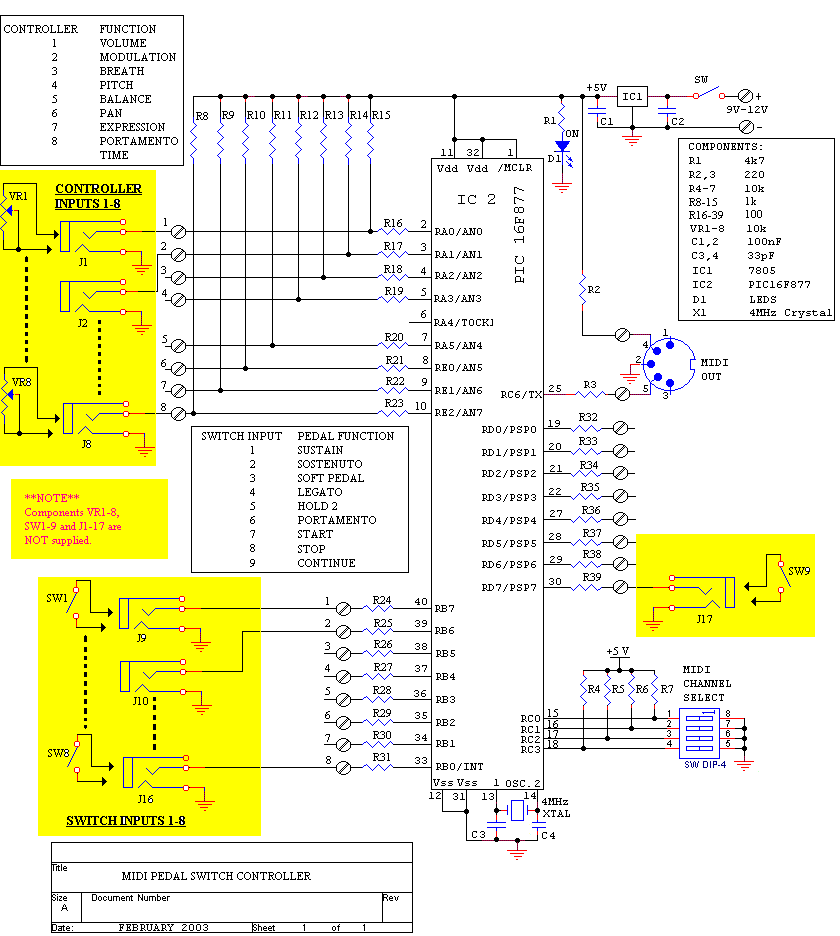
Description: The sustain pedal, also known as the damper pedal, sends a controller value of CC64 when operated. Pressing the pedal results in an output value of 127, while releasing it results in an output value of 0. Tone generators that do not implement the half-damper feature interpret values between 0 and 63 as OFF and values from 64 to 127 as ON. The sostenuto pedal is a selective sustain pedal found on acoustic grand pianos. When pressed, it sends a controller value of CC66 with a value of 127, allowing notes held on the keyboard to sustain after release. Any notes played after the pedal is pressed will not sustain, and releasing the pedal sends a value of 0. The soft pedal functions in two ways: when pressed, it sends a controller value of CC67 with a value of 127, softening the sound and altering its tone color. Releasing the pedal sends a value of 0. The legato pedal, when pressed, sends a controller value of CC68 with a value of 127, allowing the pitch of the current note to change without re-triggering the attack phase of the sound envelope. Releasing the pedal sends a value of 0. The hold 2 pedal is another sustaining pedal used for sounds with two sustain phases in their envelopes, sending a controller value of CC69 with a value of 127 when pressed and 0 when released. Portamento, or glide, is a synthesizer effect primarily used for leads and sound effects, involving a regular slide from one note to another. It utilizes two separate controllers: controller CC5 sets the portamento time, which has a range of 0-127. The portamento time value corresponds to the variable potentiometer value fed to controller input 8. When the portamento pedal is pressed, it sends a value of 127 for controller CC65, and 0 when released. The portamento effect does not require legato playing; the pitch will slide from the last note played regardless of the pause duration between notes. The start pedal sends a MIDI start code when pressed, facilitating hands-free control of MIDI hardware/software sequencers. The stop pedal sends a MIDI stop code when pressed, allowing similar control for stopping sequences. The continue pedal sends a MIDI continue code when pressed, resuming a MIDI sequence from the last stop point, also enabling hands-free operation.
The electronic schematic for the described pedal system incorporates a series of controllers and outputs that interact with a MIDI interface. Each pedal is connected to a microcontroller or MIDI interface circuit that interprets the pedal states and translates them into MIDI messages.
1. **Sustain Pedal (Damper Pedal)**: This pedal is connected to a digital input pin on the microcontroller. When the pedal is pressed, the microcontroller sends a MIDI message with the controller number CC64 and a value of 127. Upon release, the value changes to 0. The circuit may include a pull-up resistor to ensure a stable input signal.
2. **Sostenuto Pedal**: Similar to the sustain pedal, this pedal is connected to another digital input pin. The microcontroller sends CC66 with a value of 127 when pressed and 0 when released. Logic gates may be employed to manage the selective sustain functionality based on the notes currently held.
3. **Soft Pedal**: Connected to a separate input, this pedal operates similarly, sending CC67 with values of 127 and 0 to modify sound characteristics.
4. **Legato Pedal**: This pedal's connection to the microcontroller allows it to send CC68 messages, enabling pitch changes without retriggering the note's attack phase.
5. **Hold 2 Pedal**: Functioning like the other sustain pedals, this pedal sends CC69 messages, allowing for sounds with dual sustain phases.
6. **Portamento Control**: This feature requires an additional potentiometer connected to an analog input on the microcontroller. The controller CC5 is used to set the portamento time, and the portamento pedal sends CC65 messages. The microcontroller reads the potentiometer value to adjust the portamento time dynamically.
7. **MIDI Control Pedals**: The start, stop, and continue pedals are connected to digital input pins, each sending respective MIDI messages to control the sequencer's operation.
The entire circuit can be powered by a DC power supply, with appropriate voltage regulation to ensure the microcontroller and pedals operate correctly. Additionally, opto-isolators may be used to protect the microcontroller from voltage spikes or noise from the pedals. The final design allows for a comprehensive and intuitive interface for musicians, enabling flexible control over MIDI sequencing and sound generation.The sustain pedal is also known as the Damper Pedal. When operated it sends out a controller value of CC64. When the pedal is pressed ON the unit outputs a value of 127, when released OFF the unit outputs a value of 0. Tone-generators without the `half-damper` implemented will interpret a value between 0 and 63 as OFF and a value of 64 to 127 as O
N. The sostenuto pedal is a type of selective sustain pedal found on acoustic grand-pianos. Pressing down the pedal, sending controller value CC66 with a value of 127, while holding notes on the keyboard will cause these notes to be sustained after you release them. Any notes played after pressing the pedal will not sustain. When the pedal is released it sends out controller value CC66 with a value of 0. The soft pedal works in two simultaneous ways. When the pedal is pressed, sending out controller value CC67 with a value of 127, the sound should be slightly softened in terms of volume and there should be a noticeable difference in the tone-colour of the sound.
When the pedal is released it sends out controller value CC67 with a value of 0. When the legato pedal is pressed, sending out controller value CC68 with a value of 127, playing a different note changes the pitch of the current note without re-triggering the attack phase of the envelope of the sound. When the pedal is released it sends out controller value CC68 with a value of 0. The hold 2 pedal is another type of sustaining pedal used fro sounds with two sustain phases in their envelopes.
When the pedal is pressed it sends out controller value CC69 with a value of 127, when the pedal is released it sends out controller value CC69 with a value of 0. Portamento or glide is a synthesiser effect. It is mainly used for synthesiser leads and sound effects. The effect is a regular sliding from one note to another, in a similar way to pitch bend, but in this case it is the time taken rather than the distance that has to be specified.
Portamento uses two separate controllers. Controller CC5 is used to set the portamento Time, how long it takes to change the pitch by a semitone, which has a range of 0-127. The portamento time value is associated with the variable potentiometer value fed to controller input 8.
When the portamento pedal is pressed it sends out controller value CC65 with a value of 127. When the pedal is released it sends out controller value CC65 with a value of 0. The portamento effect does not require the playing to be legato, the pitch will always slide from the last note played, however long you pause between the two. When the Start pedal is operated it sends a MIDI start code when the foot-switch is pressed. This can be used to control the start/stop time of a MIDI hardware/software sequencer, allowing a musician hands free operation.
When the Stop pedal is operated it sends a MIDI stop code when the foot-switch is pressed. This can be used to control the start/continue/stop time of a MIDI hardware/software sequencer, allowing a musician hands free operation. When the Continue pedal is operated it sends a MIDI continue code when the foot-switch is pressed. This will continue a MIDI sequence from where it was stopped with the stop pedal. This can be used to control the start/continue/stop time of a MIDI hardware/software sequencer, allowing a musician hands free operation.
The electronic schematic for the described pedal system incorporates a series of controllers and outputs that interact with a MIDI interface. Each pedal is connected to a microcontroller or MIDI interface circuit that interprets the pedal states and translates them into MIDI messages.
1. **Sustain Pedal (Damper Pedal)**: This pedal is connected to a digital input pin on the microcontroller. When the pedal is pressed, the microcontroller sends a MIDI message with the controller number CC64 and a value of 127. Upon release, the value changes to 0. The circuit may include a pull-up resistor to ensure a stable input signal.
2. **Sostenuto Pedal**: Similar to the sustain pedal, this pedal is connected to another digital input pin. The microcontroller sends CC66 with a value of 127 when pressed and 0 when released. Logic gates may be employed to manage the selective sustain functionality based on the notes currently held.
3. **Soft Pedal**: Connected to a separate input, this pedal operates similarly, sending CC67 with values of 127 and 0 to modify sound characteristics.
4. **Legato Pedal**: This pedal's connection to the microcontroller allows it to send CC68 messages, enabling pitch changes without retriggering the note's attack phase.
5. **Hold 2 Pedal**: Functioning like the other sustain pedals, this pedal sends CC69 messages, allowing for sounds with dual sustain phases.
6. **Portamento Control**: This feature requires an additional potentiometer connected to an analog input on the microcontroller. The controller CC5 is used to set the portamento time, and the portamento pedal sends CC65 messages. The microcontroller reads the potentiometer value to adjust the portamento time dynamically.
7. **MIDI Control Pedals**: The start, stop, and continue pedals are connected to digital input pins, each sending respective MIDI messages to control the sequencer's operation.
The entire circuit can be powered by a DC power supply, with appropriate voltage regulation to ensure the microcontroller and pedals operate correctly. Additionally, opto-isolators may be used to protect the microcontroller from voltage spikes or noise from the pedals. The final design allows for a comprehensive and intuitive interface for musicians, enabling flexible control over MIDI sequencing and sound generation.The sustain pedal is also known as the Damper Pedal. When operated it sends out a controller value of CC64. When the pedal is pressed ON the unit outputs a value of 127, when released OFF the unit outputs a value of 0. Tone-generators without the `half-damper` implemented will interpret a value between 0 and 63 as OFF and a value of 64 to 127 as O
N. The sostenuto pedal is a type of selective sustain pedal found on acoustic grand-pianos. Pressing down the pedal, sending controller value CC66 with a value of 127, while holding notes on the keyboard will cause these notes to be sustained after you release them. Any notes played after pressing the pedal will not sustain. When the pedal is released it sends out controller value CC66 with a value of 0. The soft pedal works in two simultaneous ways. When the pedal is pressed, sending out controller value CC67 with a value of 127, the sound should be slightly softened in terms of volume and there should be a noticeable difference in the tone-colour of the sound.
When the pedal is released it sends out controller value CC67 with a value of 0. When the legato pedal is pressed, sending out controller value CC68 with a value of 127, playing a different note changes the pitch of the current note without re-triggering the attack phase of the envelope of the sound. When the pedal is released it sends out controller value CC68 with a value of 0. The hold 2 pedal is another type of sustaining pedal used fro sounds with two sustain phases in their envelopes.
When the pedal is pressed it sends out controller value CC69 with a value of 127, when the pedal is released it sends out controller value CC69 with a value of 0. Portamento or glide is a synthesiser effect. It is mainly used for synthesiser leads and sound effects. The effect is a regular sliding from one note to another, in a similar way to pitch bend, but in this case it is the time taken rather than the distance that has to be specified.
Portamento uses two separate controllers. Controller CC5 is used to set the portamento Time, how long it takes to change the pitch by a semitone, which has a range of 0-127. The portamento time value is associated with the variable potentiometer value fed to controller input 8.
When the portamento pedal is pressed it sends out controller value CC65 with a value of 127. When the pedal is released it sends out controller value CC65 with a value of 0. The portamento effect does not require the playing to be legato, the pitch will always slide from the last note played, however long you pause between the two. When the Start pedal is operated it sends a MIDI start code when the foot-switch is pressed. This can be used to control the start/stop time of a MIDI hardware/software sequencer, allowing a musician hands free operation.
When the Stop pedal is operated it sends a MIDI stop code when the foot-switch is pressed. This can be used to control the start/continue/stop time of a MIDI hardware/software sequencer, allowing a musician hands free operation. When the Continue pedal is operated it sends a MIDI continue code when the foot-switch is pressed. This will continue a MIDI sequence from where it was stopped with the stop pedal. This can be used to control the start/continue/stop time of a MIDI hardware/software sequencer, allowing a musician hands free operation.
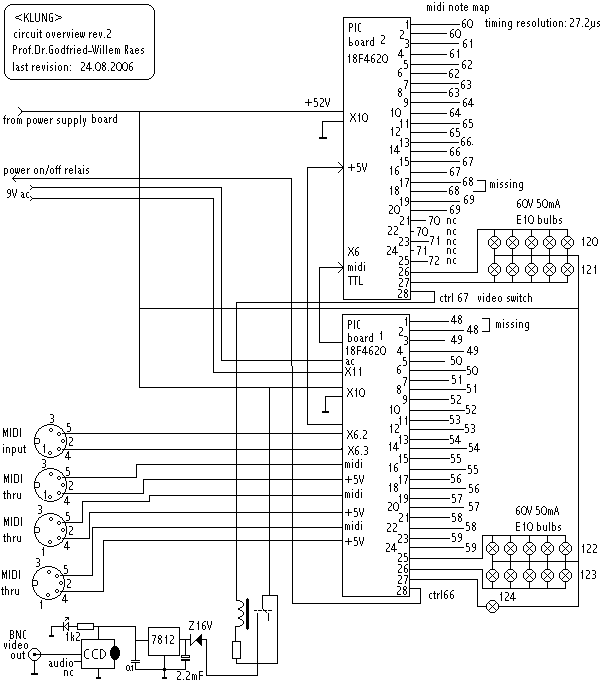
automated angklung instrument
This instrument is a computer-controlled acoustical angklung designed and built in 2000. In 2006, it underwent a major hardware upgrade. The anklungs are constructed from hardened brass and are tuned to a western scale covering two octaves. The instrument can...
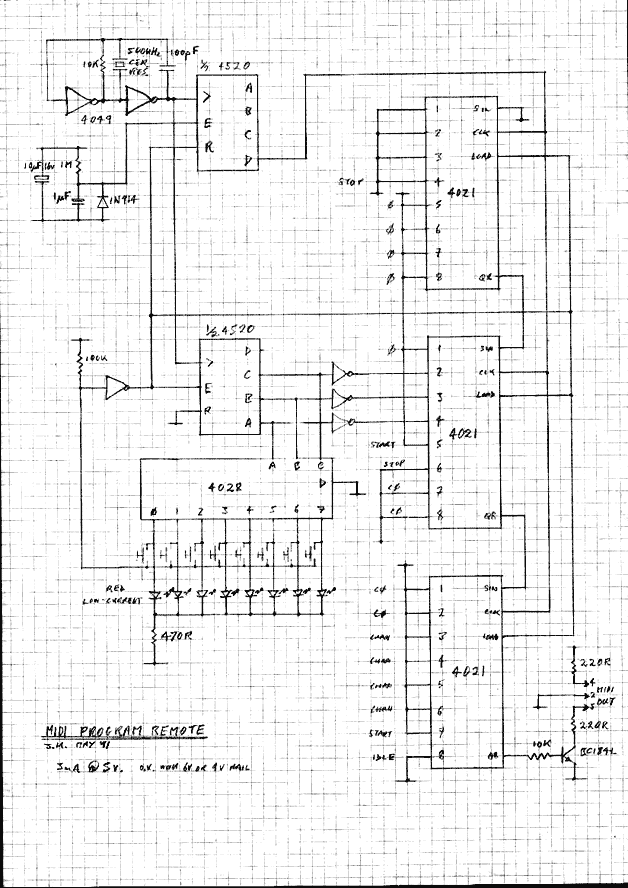
MIDI Program Changer
This circuit sends MIDI program changes. It's useful as a guitar pedalboard remote.
The circuit designed for sending MIDI program changes operates by utilizing a microcontroller or dedicated MIDI interface chip that generates MIDI messages corresponding to the selected program changes....
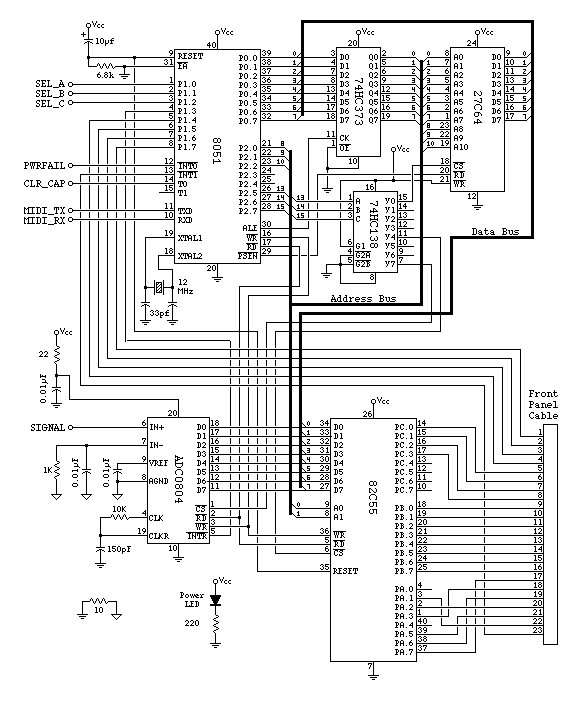
MIDI Drum Machine Schematic Main CPU Section
The 82C55 and seven-segment decoders on the display board will be replaced with a set of shift registers to eliminate the need for the 82C55 and the extensive wiring. The ADC0804 will be substituted with a serial interface ADC chip,...
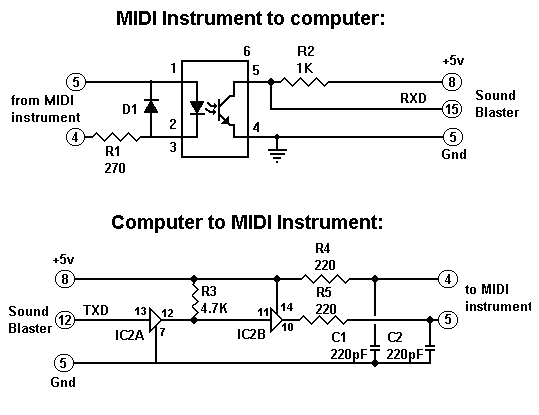
sb2 midi
Instructions for constructing a MIDI interface that connects a Sound Blaster (SB), Sound Blaster Pro (SB Pro), or Sound Blaster 16 (SB16) sound card joystick port to a MIDI-capable musical instrument.
To build a MIDI interface for connecting a Sound Blaster...
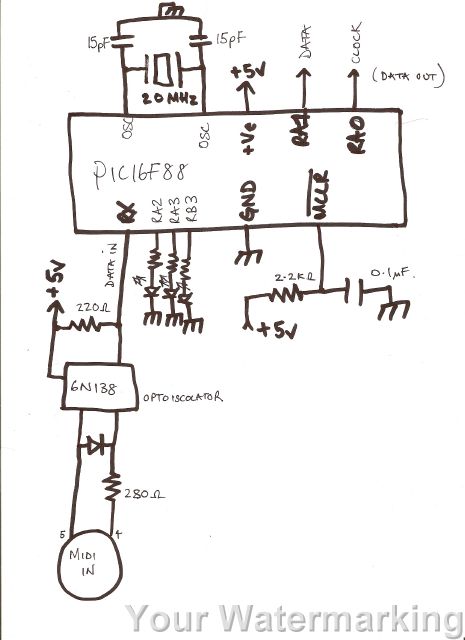
microcontroller complete code midi emulated ps 2 keyboard
A code has been developed to process MIDI data received on the RX pin of the USART. It stores three bytes of data in a buffer, checks the first byte to determine if it is a MIDI "on" message (indicated...
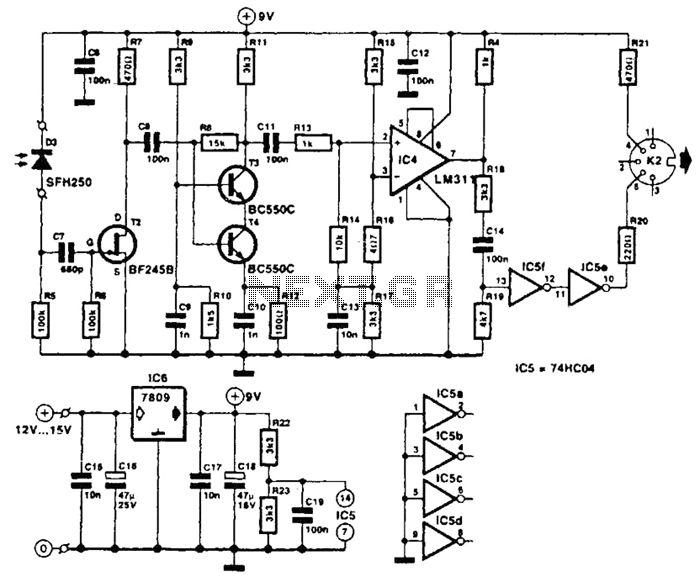
Musical Instrument Digital Interface (Midi) Receiver Circuit
The receiver photodiode SFH250 is utilized to convert optical data pulses at a rate of 32.5 Kbps into electrical signals. The buffer T2 transmits these signals to a cascade amplifier consisting of transistors T3 and T4, followed by an operational...
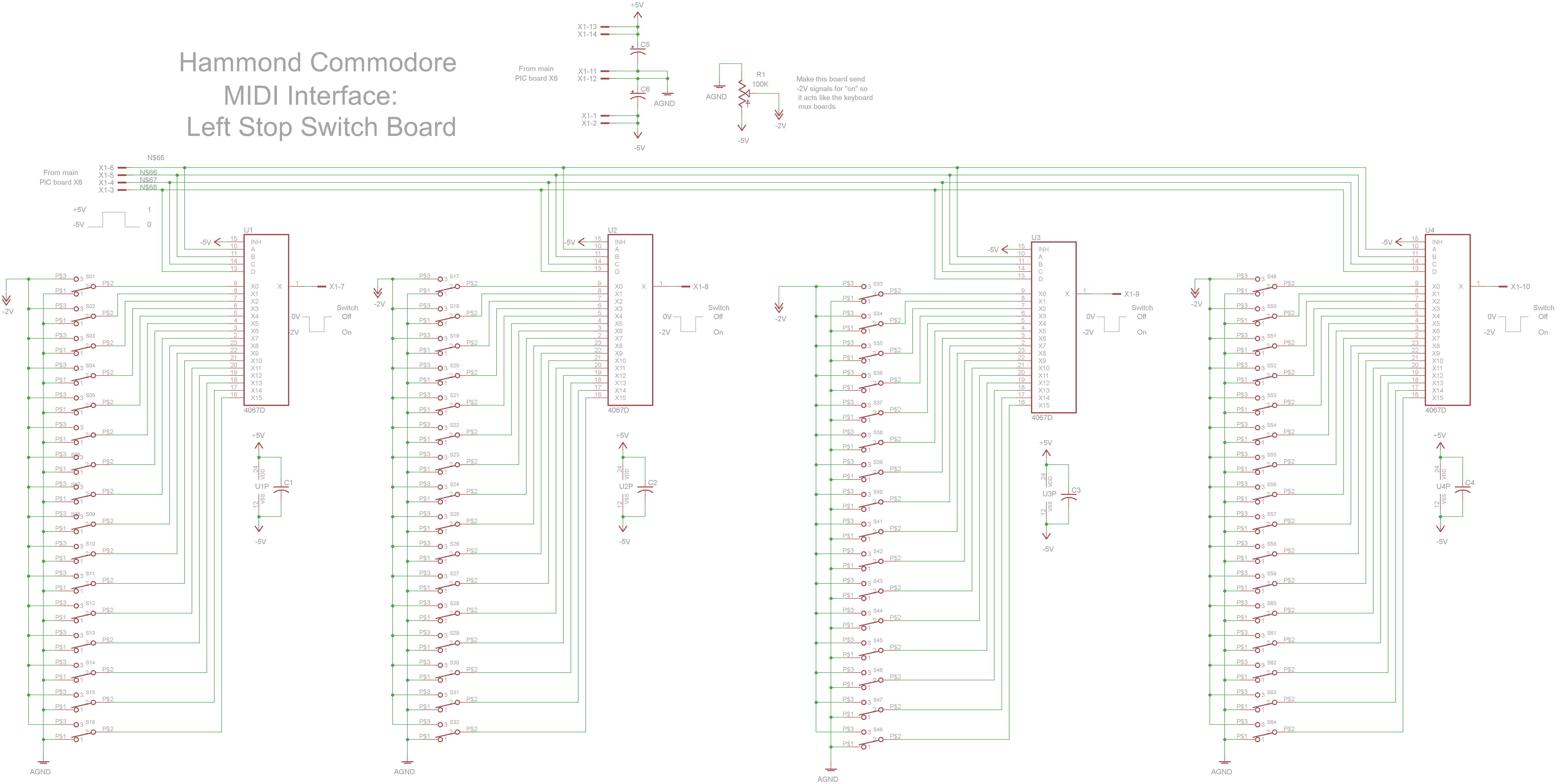
Hammond Commodore MIDI Interface
The schematic circuit board features switches that output -2V when activated and 0V when deactivated. Four 4067 multiplexers combine the 64 switch signals into 4 signals that return to the main PIC board.
The circuit design incorporates a series of switches,...
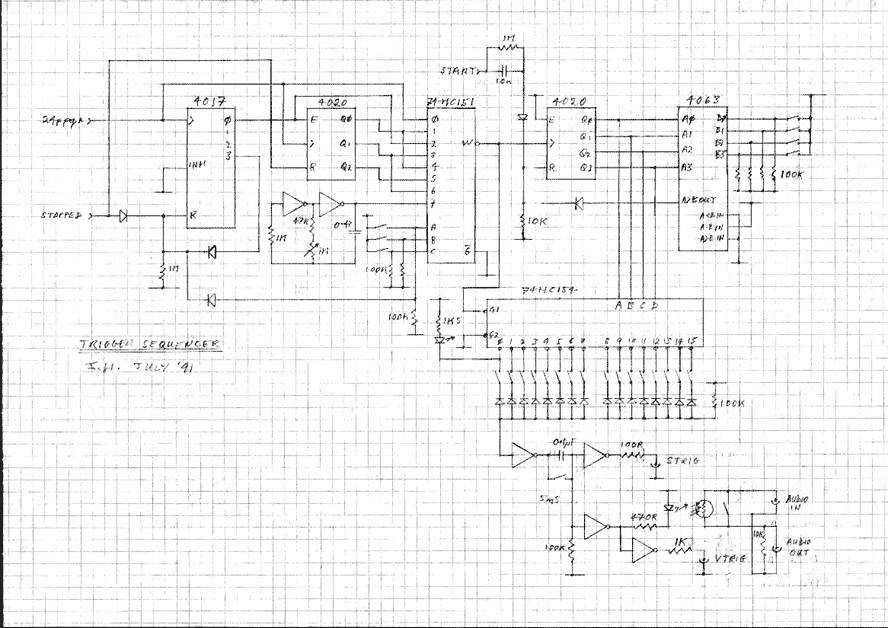
Midi Trigger Sequencer
Add this to the above circuit to get a programmable trigger sequencer. Includes an optional audio modulation stage.
The circuit described is intended to function as a programmable trigger sequencer, which allows for the generation of precise timing signals or triggers...
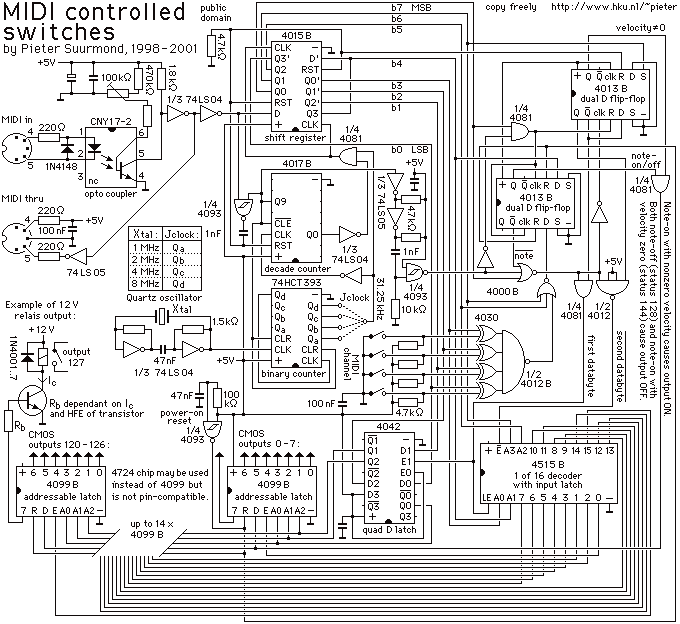
MIDI controlled switches
It can drive up to 128 individual relays, solenoids, motors, fireworks, pyrophones, etc. With a MIDI note-on message you may switch on one of the 128 LEDs (or relays). Outputs may be switched off by sending a note-off message, or...