


push puppet toy
#push puppet
#toy
#actuator
#DIY
#hobby project
#mechatronics
#simple mechanism
#fun project
#creative electronics
#home automation

Description: This project was inspired by the Availabot from Schulze and Webb. The Availabot is a puppet that stands up when a friend comes online on instant messaging and falls over when the friend goes offline. While it is an interesting toy, it has three shortcomings. To construct the device, a push puppet is required. A push puppet is a small articulated character made of several body parts connected by strings that run under tension. These strings are linked to a large spring-loaded button at the base. Pressing the button causes the strings to loosen and the puppet collapses, while releasing the button pulls the puppet back to its upright position. Push puppets are inexpensive toys for children and can be found in most toy stores. The specific puppet used in this project is a wooden dog from the "farm animals" series made by Toys Pure. The cost was approximately €2.77, and it is considered more aesthetically pleasing than the Availabot. Unlike the Availabot, which drops dead when the button is pressed, this puppet bows its head and bends its knees, which is preferred. A servo motor is also necessary; it must be strong enough to push the base of the push puppet. The Protech B112 servo, which provides a torque of 2.5 kg·cm, is suitable for this purpose, although it may experience some strain. The spring in the push puppet exerts about 2 kg of force, and the button requires movement of about 1 cm, making the B112 an appropriate choice.
A Pidgin plugin is required since Pidgin is the new name for the Gaim project starting from version 2.0. The Gaim version of the plugin is not compatible and thus a Pidgin-specific plugin must be created. To build the plugin, type "make" after ensuring the GNU PIC Utilities and the Gaim or Pidgin development files are available. If Gaim is installed, the Gaim plugin is built; if Pidgin is installed, the Pidgin version is built instead. The installation command is "make install." By default, the XChat plugin is located in the ~/.xchat2/ directory, the Gaim plugin in the ~/.gaim/plugins/ directory, and the Pidgin plugin in the ~/.purple/plugins/ directory. To specify the serial port for the puppet connection, create a configuration file named ~/.ppwrc containing the serial device name (e.g., "/dev/ttyS0"). After this setup, restart XChat, Gaim, or Pidgin to enable the corresponding plugin.
Programming the 16F628A microcontroller requires the pkp utility, part of the pikdev package. For users of the Velleman K8048 programmer, connect the 16F628A to the board or the ICSP cable to the servo control board, link the K8048 to /dev/ttyS0, and execute "make flash." For other programmers, modifications to the supplied pkprc file may be necessary to match the programmer's characteristics and serial port connections. The firmware code can be viewed online at pushpuppet.asm, which can be adapted as a generic servo controller. It is fully interrupt-driven and includes an internal servo calibration menu. Since servos can vary, configuration for the "puppet up" and "puppet down" positions is essential. This is done by connecting the controller board to a serial port, starting a terminal program like minicom, powering the board, and sending the ENTER command within one second of startup. This action activates configuration mode, allowing adjustments to the PWM period and duty cycles for both positions. The PWM period typically remains at 20 ms (20000 µs = 0x4E20), and adjustments to this value are generally unnecessary.
The design of this project integrates mechanical and electronic components to create an interactive puppet that responds to online presence notifications, showcasing the convergence of hardware and software in modern toy design.This little project was inspired by the Availabot from Schulze and Webb ( ). The Availabot is a puppet guy that rises to its feet when a friend comes online on IM, and falls over when the friend disappears. It`s a cool little toy, but it has 3 shortcomings: To make the device, you first need a push puppet. A push puppet is a small articulated cha racter composed of several body parts held together by several strings that run through them under tension. The strings are all connected to a large spring-loaded button under the base. When the button is pressed, the strings go slack and the puppet collapses. When the button is released, the strings pull the puppet back to its normal erect shape. More information on push puppets can be had at. Push puppets are cheap toys for small children, and can be found at most serious toy stores. Mine is a wooden dog from the "farm animals" series, made by Toys Pure. I paid 2. 77‚¬ for it and I find it much cuter than the Availabot guy. What`s more, it doesn`t "drop dead" like the Availabot guy when the button is pushed, but instead drops its head and bows its knees, which I find nicer.
You will also need a servo : it should be strong enough to push the base of the push puppet. Mine`s a Protech B112, which provides a torque of 2. 5kg. cm and doesn`t cost too much. The spring in my push puppet pushes about 2kg and the button needs to move about 1cm, so the B112 is about right, although it does tend to strain a bit. A Pidgin plugin: Pidgin is the new name of the Gaim project since version 2. 0. 0, but the Gaim version of the plugin won`t work as-is, so a Pidgin-specific plugin is built To build them, type "make".
You will need the GNU PIC Utilities to build the firmware ( ), and the Gaim or Pidgin development files (or package if your Linux distribution has it, like Debian) to build either the Gaim or Pidgin plugin. If you have Gaim installed, the Gaim version of the plugin is built. If you have Pidgin installed, the Pidgin version is built instead. Simply type make install. By default, the XChat plugin is installed in the ~/. xchat2/ directory, the Gaim plugin is installed in the ~/. gaim/plugins/ directory, and the Pidgin plugin in the ~/. purple/plugins/ directory. To tell the plugin(s) which serial port your puppet is connected to, create a configuration file in your home directory called ~/.
ppwrc containing a single line with the name of the serial device (for example "/dev/ttyS0"). Finally, start (or restart) Xchat, Gaim or Pidgin to enable the corresponding plugin. To program the 16F628A, you will need the pkp utility, part of the pikdev package ( ). if you use the Velleman K8048 programmer, simply connect your 16F628A to the board or your ICSP cable to your servo control board, connect the K8048 to your /dev/ttyS0 and type "make flash". If you use another programmer, you will have to modify the supplied. pkprc file to match your programmer`s characteristics. You will also need to modify this file if your programmer is connected to another serial port. If you want to take a peek at the firmware code without downloading the tarball, here is is: pushpuppet.
asm. It can be easily adapted to be a generic servo controller: it is fully interrupt-driven and has an internal servo calibration menu. No two servos are exactly alike, so you need to configure the controller for the "puppet up" and "puppet down" servo positions.
To do this, connect your controller board to a serial port, start a terminal program like minicom, fire up the board and immediately send ENTER to the board (you have one second to do this). Upon receiving ENTER at startup time, the board goes into configuration mode and the terminal program displays this: From there you can modify the servo control signal`s PWM period and duty cycles from both the "up" and "down" positions.
You shouldn`t need to modify the PWM period, it`s normally 20ms (20000us = 0x4E20). Pressing
A Pidgin plugin is required since Pidgin is the new name for the Gaim project starting from version 2.0. The Gaim version of the plugin is not compatible and thus a Pidgin-specific plugin must be created. To build the plugin, type "make" after ensuring the GNU PIC Utilities and the Gaim or Pidgin development files are available. If Gaim is installed, the Gaim plugin is built; if Pidgin is installed, the Pidgin version is built instead. The installation command is "make install." By default, the XChat plugin is located in the ~/.xchat2/ directory, the Gaim plugin in the ~/.gaim/plugins/ directory, and the Pidgin plugin in the ~/.purple/plugins/ directory. To specify the serial port for the puppet connection, create a configuration file named ~/.ppwrc containing the serial device name (e.g., "/dev/ttyS0"). After this setup, restart XChat, Gaim, or Pidgin to enable the corresponding plugin.
Programming the 16F628A microcontroller requires the pkp utility, part of the pikdev package. For users of the Velleman K8048 programmer, connect the 16F628A to the board or the ICSP cable to the servo control board, link the K8048 to /dev/ttyS0, and execute "make flash." For other programmers, modifications to the supplied pkprc file may be necessary to match the programmer's characteristics and serial port connections. The firmware code can be viewed online at pushpuppet.asm, which can be adapted as a generic servo controller. It is fully interrupt-driven and includes an internal servo calibration menu. Since servos can vary, configuration for the "puppet up" and "puppet down" positions is essential. This is done by connecting the controller board to a serial port, starting a terminal program like minicom, powering the board, and sending the ENTER command within one second of startup. This action activates configuration mode, allowing adjustments to the PWM period and duty cycles for both positions. The PWM period typically remains at 20 ms (20000 µs = 0x4E20), and adjustments to this value are generally unnecessary.
The design of this project integrates mechanical and electronic components to create an interactive puppet that responds to online presence notifications, showcasing the convergence of hardware and software in modern toy design.This little project was inspired by the Availabot from Schulze and Webb ( ). The Availabot is a puppet guy that rises to its feet when a friend comes online on IM, and falls over when the friend disappears. It`s a cool little toy, but it has 3 shortcomings: To make the device, you first need a push puppet. A push puppet is a small articulated cha racter composed of several body parts held together by several strings that run through them under tension. The strings are all connected to a large spring-loaded button under the base. When the button is pressed, the strings go slack and the puppet collapses. When the button is released, the strings pull the puppet back to its normal erect shape. More information on push puppets can be had at. Push puppets are cheap toys for small children, and can be found at most serious toy stores. Mine is a wooden dog from the "farm animals" series, made by Toys Pure. I paid 2. 77‚¬ for it and I find it much cuter than the Availabot guy. What`s more, it doesn`t "drop dead" like the Availabot guy when the button is pushed, but instead drops its head and bows its knees, which I find nicer.
You will also need a servo : it should be strong enough to push the base of the push puppet. Mine`s a Protech B112, which provides a torque of 2. 5kg. cm and doesn`t cost too much. The spring in my push puppet pushes about 2kg and the button needs to move about 1cm, so the B112 is about right, although it does tend to strain a bit. A Pidgin plugin: Pidgin is the new name of the Gaim project since version 2. 0. 0, but the Gaim version of the plugin won`t work as-is, so a Pidgin-specific plugin is built To build them, type "make".
You will need the GNU PIC Utilities to build the firmware ( ), and the Gaim or Pidgin development files (or package if your Linux distribution has it, like Debian) to build either the Gaim or Pidgin plugin. If you have Gaim installed, the Gaim version of the plugin is built. If you have Pidgin installed, the Pidgin version is built instead. Simply type make install. By default, the XChat plugin is installed in the ~/. xchat2/ directory, the Gaim plugin is installed in the ~/. gaim/plugins/ directory, and the Pidgin plugin in the ~/. purple/plugins/ directory. To tell the plugin(s) which serial port your puppet is connected to, create a configuration file in your home directory called ~/.
ppwrc containing a single line with the name of the serial device (for example "/dev/ttyS0"). Finally, start (or restart) Xchat, Gaim or Pidgin to enable the corresponding plugin. To program the 16F628A, you will need the pkp utility, part of the pikdev package ( ). if you use the Velleman K8048 programmer, simply connect your 16F628A to the board or your ICSP cable to your servo control board, connect the K8048 to your /dev/ttyS0 and type "make flash". If you use another programmer, you will have to modify the supplied. pkprc file to match your programmer`s characteristics. You will also need to modify this file if your programmer is connected to another serial port. If you want to take a peek at the firmware code without downloading the tarball, here is is: pushpuppet.
asm. It can be easily adapted to be a generic servo controller: it is fully interrupt-driven and has an internal servo calibration menu. No two servos are exactly alike, so you need to configure the controller for the "puppet up" and "puppet down" servo positions.
To do this, connect your controller board to a serial port, start a terminal program like minicom, fire up the board and immediately send ENTER to the board (you have one second to do this). Upon receiving ENTER at startup time, the board goes into configuration mode and the terminal program displays this: From there you can modify the servo control signal`s PWM period and duty cycles from both the "up" and "down" positions.
You shouldn`t need to modify the PWM period, it`s normally 20ms (20000us = 0x4E20). Pressing
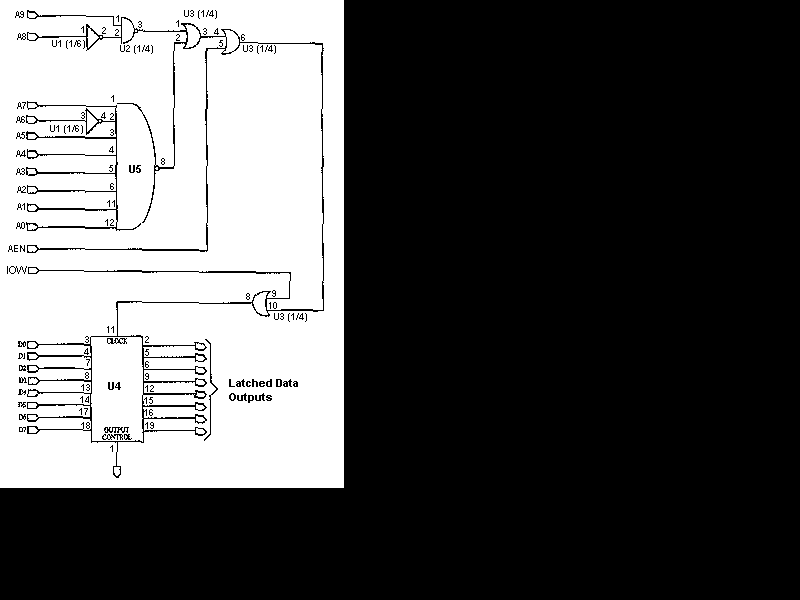
Computerize Your Room/House
You have read about computerized rooms or seen home automation products advertised in electronics magazines. You have decided to try it yourself. However, it is important to note that this project is not inexpensive. A computer is required, which is...
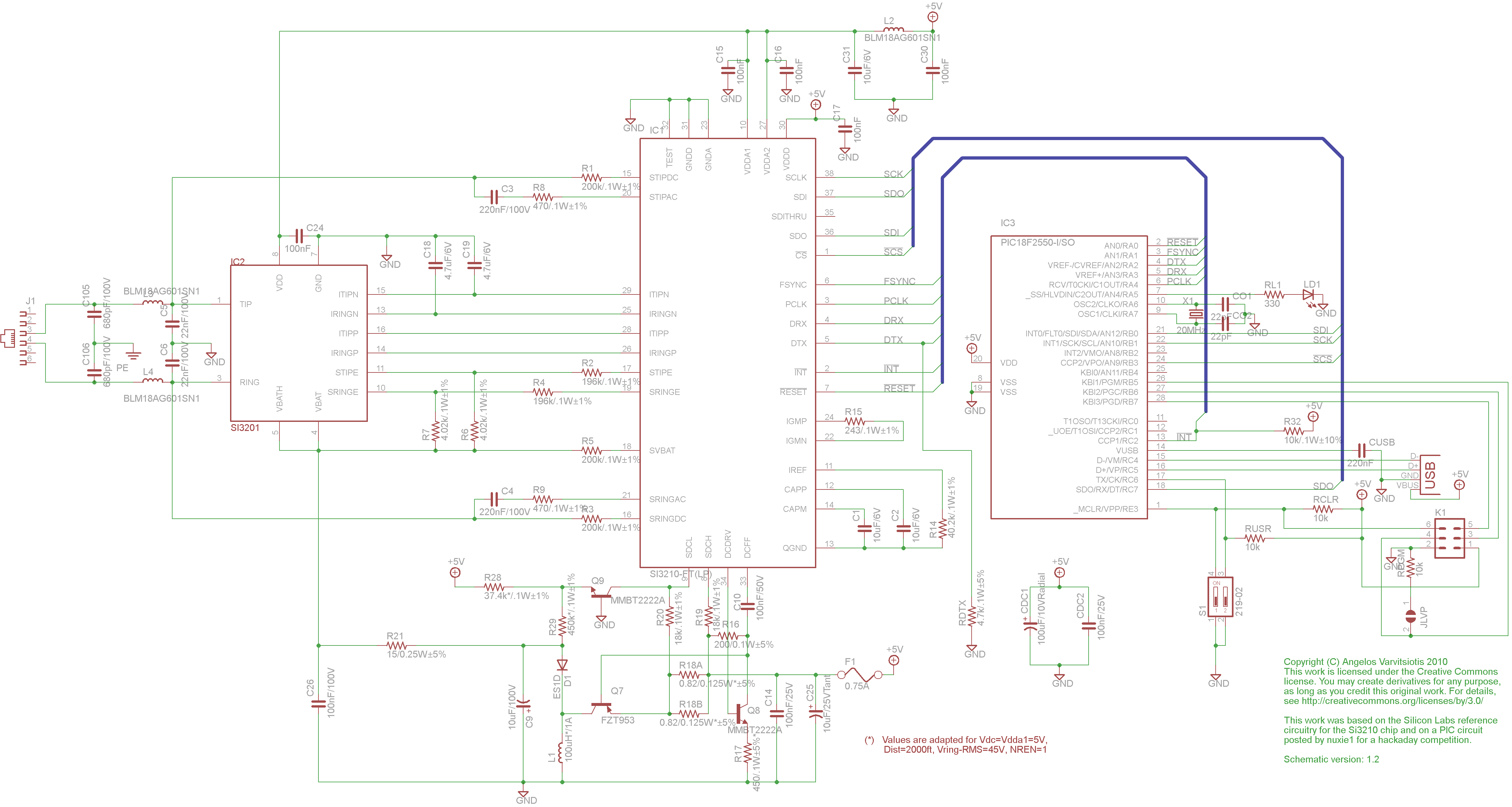
dyi setup and debugging guide
This page discusses the differences between assembled Open USB FXS dongle boards and DIY boards. While the assembled boards are fully tested and quality control approved, DIY boards may encounter various issues during assembly. Fortunately, most of these issues can...

turret diy
For maximum mini-security, this RC Tupperware Turret delivers a formidable deterrent against food theft. While it lacks motion sensors, potential food thieves will think twice before attempting to swipe baked goods. This 11-hour project, designed by Chris of PyroElectro, emphasizes...
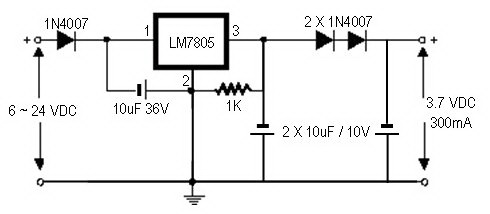
how to convert a 9v battery to 3.7v
A regulator circuit is needed for this DIY project. Familiarity with electronic components, circuitry, the use of a multitester, and a soldering iron is essential. The schematic diagram provided can accept an input voltage ranging from 6 to 24 volts...
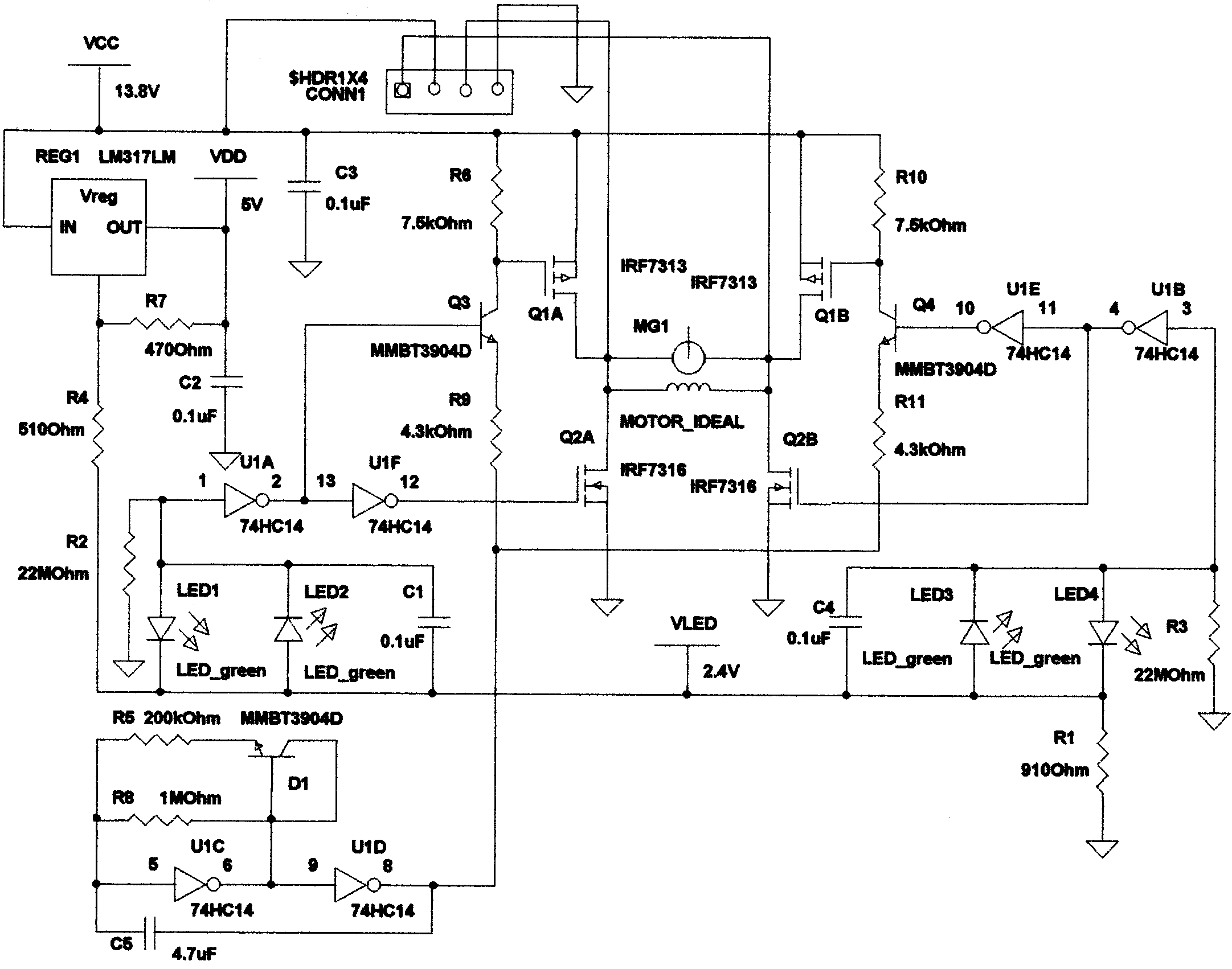
Actuator circuit
This controller consists of three pairs of LED sensors arranged in a 3G-bridge configuration. The driver is capable of operating three actuators, with the motors connected in a Delta configuration. The apexes of the delta are linked to the center...
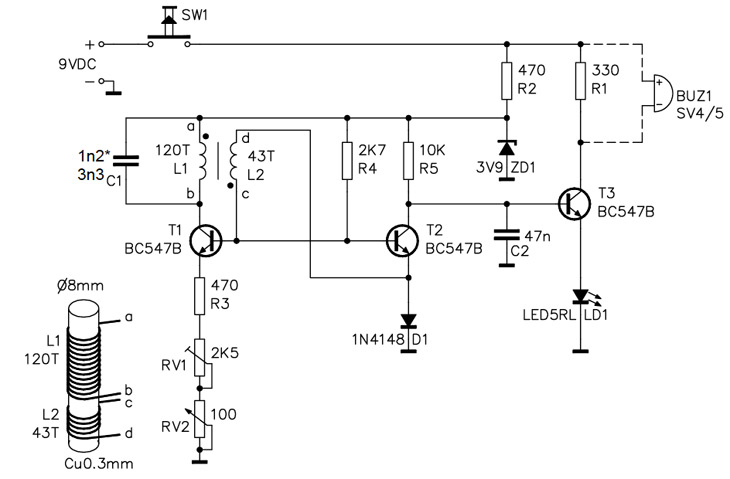
Homemade Metal Detector Kit
A simple home project can quickly become problematic if it encounters electric cables, gas, or water pipes, or the central heating system. Using a metal detector allows one to check for metal objects within walls, ceilings, or floors beforehand. An...
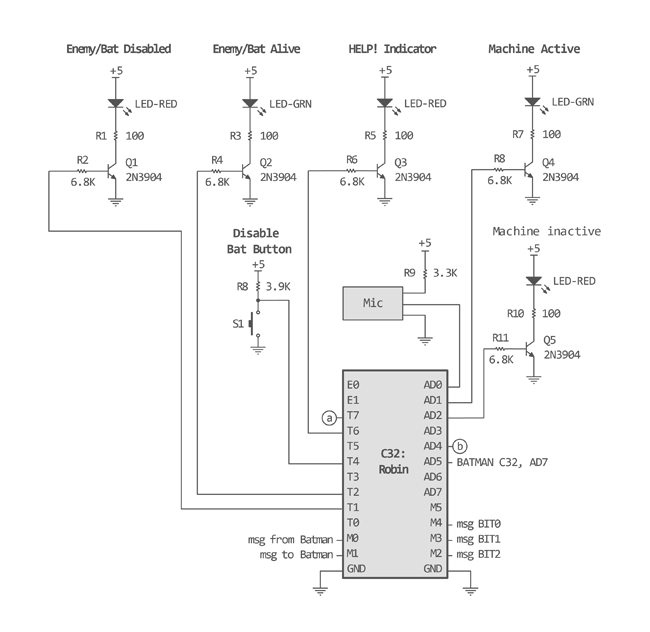
batcopter
The Batcopter was developed for Stanford's inaugural Mechatronics course, ME218A. It serves as a mechanical adaptation of the classic flash game Helicopter, featuring enhanced interactions that introduce complexity, including enemies and various difficulty levels. The game accommodates two players, with...
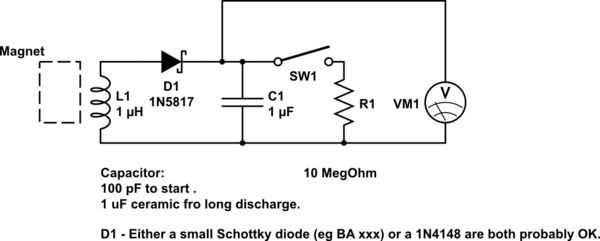
DIY kinetic energy harvester
A DIY kinetic energy harvester utilizing the electromagnetic method to generate electricity. The materials that will be used are currently known.
The project involves creating a kinetic energy harvester that converts mechanical energy from motion into electrical energy through electromagnetic induction....
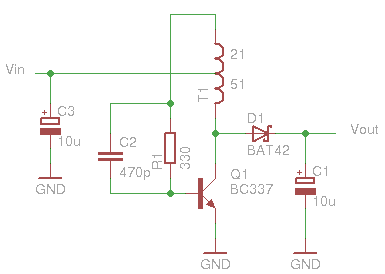
Glue stck torch
This project, developed around 2005, involves constructing a torch using a glue stick, which conveniently accommodates an AA battery within its plastic casing. To create a functional battery holder, contacts for both the positive and negative connections are necessary. The...